3 Editions · AI-Powered · Arch Linux

System Rescue
Redefined.

A bootable Linux toolkit for system recovery and diagnostics — powered by AI.

The everything ISO — one USB, every tool you need.

Buy ClawMagic Now See How It Works
320+
Packages
50+
Custom Scripts
2x
Kernels Included
From $12
One-Time

See It in Action

A polished XFCE desktop with every rescue tool one click away.
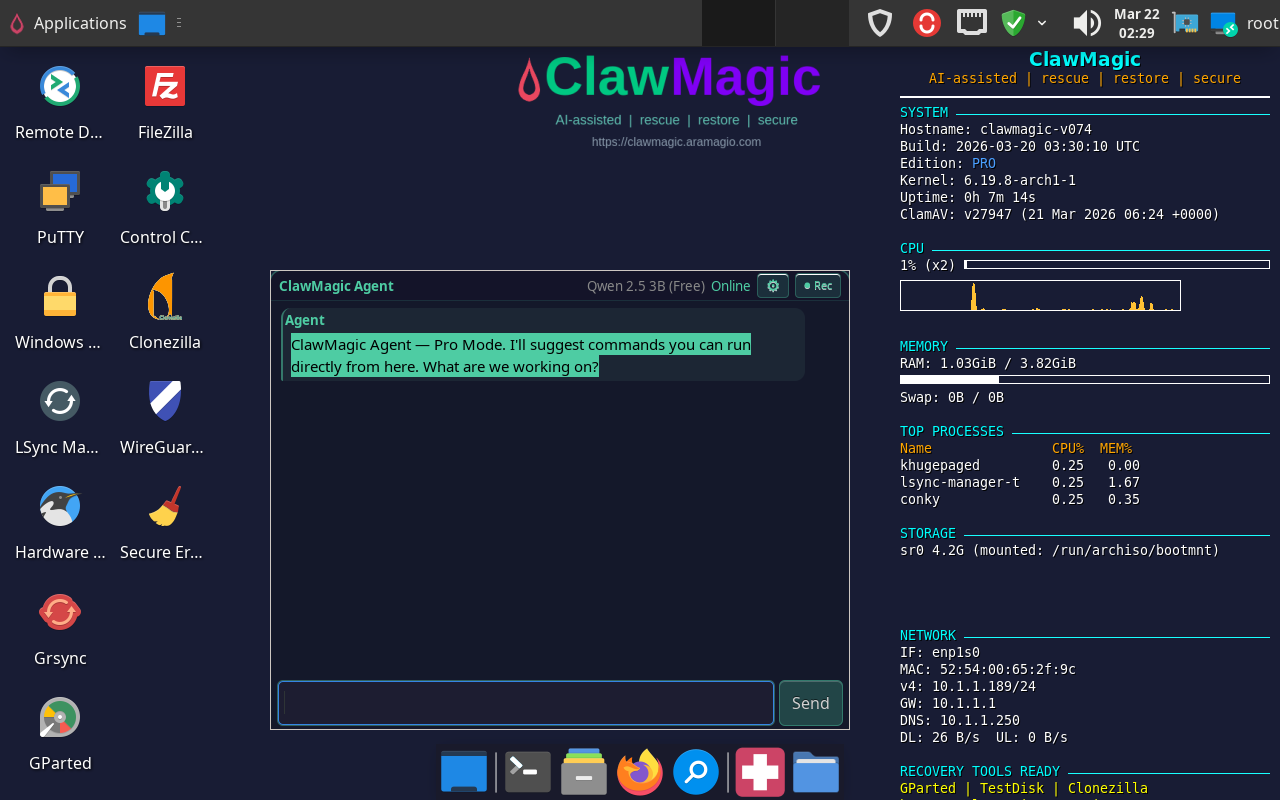
Watch
AI Chat
Lsync Manager
Disk Rescue

Up and Running in 3 Steps

No installation required. Boot from USB on any PC — your existing system stays untouched.

1

Download the ISO

Purchase your edition and get an instant download link. The ISO is ~4.2 GB.

2

Write to USB

Use Rufus, Etcher, or dd to flash the ISO to any USB drive (8 GB+).

3

Boot & Rescue

Plug in, boot from USB, and you're on a full XFCE desktop with every tool ready to go.

Choose Your Edition

Every edition includes 320+ packages — higher tiers unlock more power.

Starter
$12
one-time purchase
  • Full Arch Linux + XFCE desktop (320+ packages)
  • AI Chat — advisory mode (troubleshooting help)
  • 40+ custom ClawMagic scripts
  • Dual kernel (mainline + LTS)
  • Boot from USB — ready to go
  • Secure Boot support
Get Starter
Power User
Ultimate
$99
one-time purchase
  • Everything in Pro, plus:
  • $20 ClawMagic AI Credits included free
  • Personal API key — works with any OpenAI-compatible tool
  • AI Agent — autonomous mode with auto-execution
  • Priority email support
  • Additional credit packs available below
Get Ultimate

All sales are final — no refunds. Please review features before purchasing.

Everything You Need in One Boot

A complete rescue environment with a polished XFCE desktop, ready to work the moment you boot.

Disk Recovery & Cloning

GParted, TestDisk, PhotoRec, ddrescue, Clonezilla, partclone, and fsarchiver. Recover lost partitions, rescue deleted files, clone failing drives.

Antivirus & Security

ClamAV with live panel status, automatic definition updates, and one-click scanning. Secure erase with nwipe. VeraCrypt, KeePassXC, GnuPG encryption.

Hardware Diagnostics

SMART health monitoring, lm_sensors, stress testing, benchmarking with fio and bonnie++. Identify any hardware with hwinfo, inxi, dmidecode.

Networking & Remote Access

WireGuard VPN, SSH, VNC, RDP, Wireshark, nmap. Connect remotely and troubleshoot any machine on the network.

Every Filesystem Covered

ext2/3/4, NTFS, FAT, exFAT, Btrfs, XFS, ZFS, bcachefs, F2FS, APFS (read), LUKS, LVM2, and software RAID. If it exists, ClawMagic reads it.

Always Current

Built on Arch Linux rolling release. Every build pulls the latest kernel, firmware, and tools. No stale packages, no waiting for the next release.

AI Tech Agent

Built-in AI powered by Claude — get help, troubleshoot issues, learn as you go

All Editions

Twinkle VoIP

Custom-built Qt6 SIP softphone — make calls from your rescue desktop

Pro & Ultimate

Control Center

One GUI launcher for all 50+ ClawMagic tools — organized and searchable

Pro & Ultimate

ClawMagic AI Credits

One key, five models — Claude, GPT-4o, MiniMax & more. Buy credits, we handle routing.

Any Customer

VNC Remote Desktop

Built-in VNC server with one-click start/stop and auto-firewall — access from anywhere

All Editions

Offline Documentation

15 built-in guides accessible without internet — learn every tool right from the desktop

All Editions

Session Snapshots

Save your entire live session state to USB or network — restore it on next boot

All Editions

MCP System Tools

Connect Claude Code or Cursor and control disk diagnostics, recovery, and cloning via AI

All Editions

ClawMagic vs. Alternatives

See how ClawMagic compares to other rescue environments.

Feature ClawMagic Hiren's BootCD PE Parted Magic SystemRescue
PriceFrom $12FreeFree
Base OSArch LinuxWindows 11 PESlackwareArch Linux
Rolling release✓✗✗✓
Full desktop (XFCE)✓Windows shell✓✓
Dual kernel (mainline + LTS)✓✗✗✓
Integrated antivirus✓✓✓✗
ZFS + bcachefs✓✗✓bcachefs only
WireGuard VPN (GUI)✓✗✗CLI only
AI Tech Agent✓✗✗✗
Multi-LLM AI Credits✓ (5 models)✗✗✗
VoIP Client (Pro+)✓✗✗✗
Clonezilla built-in✓✗✓✗
LibreOffice / GIMP / VLC✓VLC onlyLibreOffice + VLC✗
Windows password reset✓✓✓✓
Secure Boot support✓✗✓✗
Custom GUI scripts43 (all) / 50 (Pro+)✗✗✗
MCP AI System Tools✓✗✗✗
Built-in VNC server✓✗✗✓
Offline documentation (15 guides)✓✗✗✗
Session snapshots✓✗✗✗
Digitally signed editions✓✗✗✗
Last updatedActive (2026)March 2024ActiveActive

ClawMagic AI Credits

One key. Five models. No accounts needed.

Buy credits and use them across Claude Sonnet 4, Claude Haiku 4.5, GPT-4o, GPT-4o Mini, and MiniMax M2.5 (free). ClawMagic handles model routing, token tracking, and billing — you just pick the model in the AI Agent chat and go. Free models like MiniMax don't consume credits at all.

$10
Credit Pack
$7.20 API budget
Buy $10
$20
Credit Pack
$14.40 API budget
Buy $20
$50
Credit Pack
$36.00 API budget
Buy $50
$100
Credit Pack
$72.00 API budget
Buy $100
$200
Credit Pack
$144.00 API budget
Buy $200

Need a different amount? Enter a custom value ($10 minimum):

$ Buy Credits

Each pack provisions a personal API key with prepaid credits. Keys are delivered instantly after purchase and via email. Credits are valid for 12 months from purchase. Available to any ClawMagic customer.

Use your key with any OpenAI-compatible tool. Set the API base to:

https://clawmagic.aramagio.com/v1

Works with Cursor, Continue, Open WebUI, and any tool that supports custom OpenAI endpoints.

AI-Powered System Tools

The first rescue ISO with built-in MCP — let your AI assistant operate the system directly.

What is MCP?

MCP (Model Context Protocol) connects AI coding assistants like Claude Code and Cursor directly to your ClawMagic system over SSH. Instead of copy-pasting terminal output, your AI runs structured tools with safety checks built in.

Connect in Seconds

// Add to your AI tool config
{
  "clawmagic": {
    "command": "ssh",
    "args": ["root@your-ip", "clawmagic-mcp"]
  }
}

29 Built-in Tools

● Disk Health Check
● Partition Scanner
● File Recovery
● Disk Cloning
● Secure Wipe
● System Report
● Run Commands
● File Operations
● Screenshots
● System Info

Safety first: Boot device protection, mounted partition checks, same-device guards. Destructive operations require explicit confirmation.

Pre-Installed Tools

A curated selection of the best open-source tools, ready to use without installation.

GParted
TestDisk
PhotoRec
ddrescue
Clonezilla
ClamAV
Wireshark
nmap
WireGuard
Firefox
LibreOffice
GIMP
VLC
VeraCrypt
KeePassXC
Remmina
Filezilla
smartmontools
htop / btop
stress-ng
chntpw
Wine
GHex
rclone

Technical Specifications

Base
Arch Linux (rolling release)
Desktop
XFCE 4 with Materia theme & Papirus icons
Architecture
x86_64
Boot Modes
BIOS (Syslinux) + UEFI (GRUB with Secure Boot shim/MOK)
Kernels
linux (mainline) + linux-lts — dual kernel for max compatibility
Packages
320+ pre-installed, 50+ custom scripts
ISO Size
~4.2 GB (SquashFS with zstd level 19)
USB Requirement
8 GB or larger USB drive
Firmware
Intel, AMD, Marvell, QLogic, Broadcom, bnx2x + microcode
VM Support
VMware, VirtualBox, QEMU/KVM, Hyper-V, SPICE
GPU Drivers
AMD, ATI, Intel, Nouveau, QXL, VESA, fbdev
Integrity
SHA256 hash verified — every ISO ships with a checksum file
Licensing
HMAC-SHA256 signed edition keys — tamper-proof, watermarked per buyer
MCP Tools
29 built-in tools for AI-driven disk health, recovery, cloning, and wiping

Frequently Asked Questions

ClawMagic is a bootable USB toolkit built on Arch Linux. You download an ISO file, write it to a USB drive, and boot any PC from it. It gives you a full XFCE desktop with 320+ pre-installed packages for disk recovery, system diagnostics, hardware testing, antivirus scanning, and more. Your existing hard drive is not modified — everything runs from the USB.
ClawMagic works on any x86_64 PC or laptop — both BIOS and UEFI, including Secure Boot. It ships with dual kernels (mainline + LTS) for maximum hardware compatibility, plus firmware for Intel, AMD, Broadcom, Marvell, and more. It also works in virtual machines (VMware, VirtualBox, QEMU/KVM, Hyper-V).
Any USB drive 8 GB or larger. USB 3.0 is recommended for faster boot times. Use Rufus (Windows), Etcher (cross-platform), or dd (Linux/macOS) to write the ISO.
The AI Chat is a built-in desktop app that connects to multiple AI models through our secure gateway. Starter gets advisory mode with MiniMax M2.5 (free). Pro unlocks hands-on partner mode and includes $5 in free AI Credits. Ultimate unlocks autonomous agent mode with auto-execution, plus $20 in free AI Credits. With ClawMagic AI Credits (available to any customer), you can switch between Claude Sonnet 4, Claude Haiku 4.5, GPT-4o, GPT-4o Mini, and MiniMax M2.5 — we handle routing and token tracking. Free models don't consume credits.

AI Credits let you use premium AI models (Claude Sonnet 4, Claude Haiku 4.5, GPT-4o, GPT-4o Mini) directly from the ClawMagic AI Chat — no API accounts needed.

How to use: After purchase, you receive an API key instantly. Enter it in Settings and start chatting. Pick any model from the dropdown.

Budget per pack: Each credit pack includes an API budget that covers real token costs. For example, the $10 pack includes $7.20 in API budget. Free models like MiniMax M2.5 never consume credits.

ModelInputOutput
Claude Sonnet 4$3/M$15/M
Claude Haiku 4.5$0.80/M$4/M
GPT-4o$2.50/M$10/M
GPT-4o Mini$0.15/M$0.60/M
MiniMax M2.5FreeFree

Tip: For everyday questions, GPT-4o Mini or Claude Haiku give you the best value per credit.

All editions include the full Arch Linux desktop with 320+ packages. Starter ($12) gives you the core rescue toolkit with 40+ custom scripts and advisory AI Chat. Pro ($39) adds $5 in free AI Credits, all 50 scripts (adds LVM, RAID, snapshots, replication), Twinkle VoIP client, Control Center GUI, and hands-on AI mode. Ultimate ($99) adds $20 in free ClawMagic AI Credits, a personal API key, autonomous AI Agent mode, and priority support. Any customer can also purchase AI Credit packs separately.
No. ClawMagic runs entirely from the USB drive and RAM. Your internal drives are not mounted or modified unless you explicitly choose to work with them using the rescue tools. This makes it safe for diagnostics and recovery on drives with unknown issues.
Not sure if ClawMagic will work on your hardware? Download our free Compatibility Checker first — it’s a lightweight ISO that tests your system automatically. ClawMagic also ships with dual kernels (mainline + LTS) for maximum compatibility. If you still have trouble, use the built-in AI tech support agent to guide you, or contact us at support@aramagio.com.
MCP (Model Context Protocol) lets AI coding assistants like Claude Code and Cursor connect to your ClawMagic system over SSH. Once connected, the AI can run disk health checks, scan partitions, recover files, clone drives, and securely wipe disks — all through natural language commands. ClawMagic ships with 29 built-in MCP tools. Just add the SSH connection to your MCP config and start asking your AI to work with the system. All destructive operations have built-in safety checks.
Yes. Every ClawMagic ISO includes a digitally signed license key (HMAC-SHA256) that verifies your edition. The key is validated by a compiled binary — it can’t be bypassed by editing a text file. Each ISO also ships with a SHA256 checksum file so you can verify download integrity.
After payment, you'll see a download link immediately on the confirmation page. You'll also receive an email with your download link. Download links are valid for 7 days and can be used multiple times.
All sales are final — no refunds are offered. Since ClawMagic is a digital download (ISO file), we encourage you to review the features, specs, and FAQ on this page before purchasing. If you have questions about whether ClawMagic will work for your use case, ask our AI chatbot or email support@aramagio.com before buying.

Ready to Rescue?

Get a professional toolkit on USB in minutes. Starting at $12, one-time purchase.

Buy ClawMagic Now

Need Help?

We're here to help you get the most out of ClawMagic.

Email Support

Questions about your purchase, downloads, or technical issues? We typically respond within 24 hours.

support@aramagio.com

Billing & Downloads

Issues with payments or download links? Contact us and we'll get you sorted.

billing@aramagio.com

AI Agent

Quick questions about ClawMagic? Our AI chatbot is available right here on this page — click the chat bubble below.

Open Chat

Help Center

Open a support ticket and track it in our help desk — sign in or create an account.

Open a ticket
CMBot
ClawMagic Agent
Hi! I'm CMBot. Ask me anything about ClawMagic editions, features, or pricing.

All 29 MCP Tools

Core (7)
Run Command
Read File
Write File
List Files
Deploy File
Screenshot
System Info
Disk Health & Partitions (3)
Disk Health (SMART)
Partition Scanner
Disk Compare
Disk Operations (5)
Mount Partition
Unmount Partition
Create Partition
Format (20 filesystems)
Benchmark Disk
Recovery & Repair (4)
File Recovery (PhotoRec)
Filesystem Repair
Bootloader Repair
Password Reset
Destructive Operations (2)
Disk Clone
Secure Wipe (DoD)
Network (3)
Network Info
Speed Test
WireGuard Status
Hardware & System (3)
Hardware Probe
Process List
Service Manager
Data & Forensics (2)
Checksum (MD5/SHA)
File Finder
landing_mcp_cat_lvm
LVM Scan
Physical Volumes
Volume Groups
Logical Volumes
LVM Diagnostics
landing_mcp_cat_build
Get Version
Build Status
Generate Report
Job Status